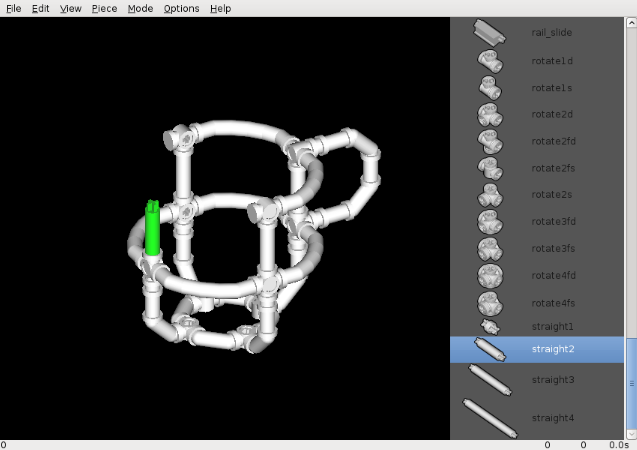
With the growing emphasis on and excitement over STEM (Science, Technology, Engineering, Math) education, home educators want ways to engage their students in engineering design skills. One way to do this is through CAD (Computer-Aided Design).
Crossbeams, an advanced construction toy, makes its Crossbeams Modeller CAD software downloadable for free. Crossbeams Modeller provides a simple introduction to CAD, since it only uses Crossbeams pieces. A comprehensive manual and tutorial videos (see links below) are also available for free.
With the Crossbeams Modeller CAD software, your student can:
- become familiar with computer-aided design software
- build proficiency in software design skills
- create, modify, optimize, and experiment with mechanical designs
- learn to read and operate from a technical manual
Available for the following operating systems:
- Linux – Tested on Debian 7.0.
- Mac – Tested on OS X 10.6.8. You must first install XQuartz.
- Windows – Tested on Windows 7.
TUTORIAL VIDEOS:
Crossbeams Modeller Introduction – This video introduces you to the Crossbeams Modeller and its basic capabilities.
Crossbeams Modeller Editing – This video demonstrates advanced Crossbeams Modeller editing features while building a rocket.
CLICK HERE for a TON of Homeschool Freebies!

Need hope in your homeschooling journey? Read Hope for the Heart of the Homeschool Mom: Encouragement for Days When Sanity is Limited.


Latest posts by Free Homeschool Deals (see all)
- FREE Fall Leaves & Trees Activity Book (PreK–3, 24 Pages) — Illinois DNR - October 13, 2026
- FREE Junior Cave Scientist Activity Booklet (24 Pages) — National Park Service - October 13, 2026
- FREE Pumpkin Unit Study Printables (39 Pages) — Alabama Ag in the Classroom - October 13, 2026
- FREE Coding Maze Printables (6-Page Sampler) — Independent Digital Studio - October 13, 2026
- FREE Fantasticamos Grammar Printables — Blogging4Adventure - October 12, 2026
